If you've ever pulled a call recording and heard the prospect say "who is this?" three seconds in, you already know the answer. Their screen said Wireless Caller, or worse, some random city 400 miles from where you bought the number. CNAM is the fix — but it's slower, messier, and less universal than most providers let on.
Here's what actually happens when you register a caller-ID name, what it costs you in time (not dollars — those depend on your carrier), and where CNAM quietly fails so you can plan around it.
What CNAM actually is, in one paragraph
CNAM is a 15-character text label tied to a phone number and stored in a database the terminating carrier queries when a call comes in. You don't push CNAM to the called party. The called party's carrier looks it up — if they look it up at all — and decides whether to display it. That last part is the whole story: you register, they display (maybe).
There are two sides to this:
- Outbound CNAM (CNAM storage / CNAM registration): the label you put in the LIDB/CNAM database against your DID. This is what you control.
- Inbound CNAM (CNAM dip): what a receiving carrier pays to look up. You don't control this side at all.
When people say "register CNAM," they mean the first one.
Why your outbound calls still show "Unknown" or the wrong city
A few reasons, in rough order of how often we see them:
- You never registered a CNAM. Default display is whatever the terminating carrier's rate-center lookup returns — usually the city the number was originally assigned to, or a generic Wireless Caller / Unknown.
- You registered CNAM with your origination provider, but the number is being sent from a different carrier. CNAM lives at the number level in LIDB, not with the outbound carrier. If your provider didn't actually push the update, it doesn't matter what you typed in the portal.
- The terminating carrier doesn't do CNAM dips on mobile. T-Mobile, AT&T, and Verizon largely don't display CNAM on wireless calls unless the subscriber has a specific feature enabled or the call is authenticated via STIR/SHAKEN with a good attestation. This is the big one for outbound dialers — most of your called parties are on mobile, and mobile mostly ignores CNAM.
- Spam analytics overrode it. Even if CNAM would display, Hiya/TNS/First Orion labels take priority on many handsets. You can register a perfect CNAM and still show up as Scam Likely.
That fourth point is the reality check. CNAM is worth doing, but it is not the lever that fixes answer rates on mobile-heavy lists. Branded caller ID (RCD, Verified Calls, Enhanced Caller ID) is a separate track — related, but not the same product.
Registering CNAM on a bulk block
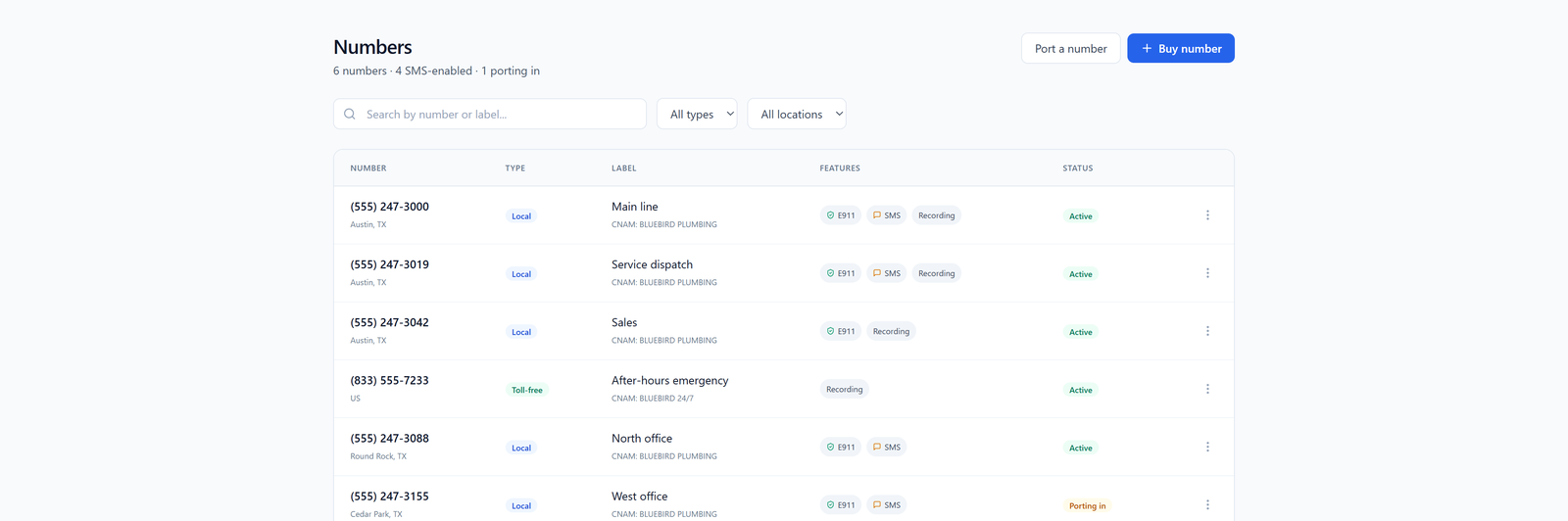
For small blocks, most portals give you a per-number edit field. For anything at scale, you want bulk. A couple of things to nail down with your provider before you upload a CSV:
- What's the character limit they enforce? LIDB standard is 15 characters including spaces. Some providers silently truncate at 14. Test with one number first.
- How long until propagation? The honest answer is 24 hours to 14 days depending on which downstream LIDB databases they push to. Neustar/Transaction Network Services and iconectiv update on different cadences. If a provider promises "instant CNAM," they mean instant in their database — not in the ones that matter.
- Do they charge per update or per number per month? Ask for the line item. Some bury CNAM storage in the per-DID monthly; others charge per change. If you're rotating numbers, per-change adds up.
- Can they push CNAM in a bulk CSV job, or is it one API call per number? For a 500-DID block, that difference is the difference between an afternoon and a week.
A typical bulk CSV looks like:
tn,cnam
+13105551001,ACME PLUMBING
+13105551002,ACME PLUMBING
+13105551003,ACME PLUMBING
Keep the label identical across a block if you want consistent branding. Mixing labels on rotating numbers just makes the called party more suspicious, not less.
What to put in the 15 characters
Short, readable, and matches how you introduce yourself on the call. If your agents say "Hi, this is Sam from Acme Roofing," your CNAM should say ACME ROOFING, not ACME ROOF SVC LLC. Uppercase is standard and most databases normalize to it anyway.
A few things to avoid:
- Phone numbers in the CNAM field. Some LIDBs reject it, and it looks like a spam pattern to analytics engines.
- All-caps SALES or SURVEY or similar function words with no brand. Those get flagged fast.
- Names that don't match your registered business or your 10DLC brand if you're also sending SMS. Consistency across 10DLC brand registration and CNAM helps your legitimacy signal.
CNAM alone won't fix answer rates. Here's what pairs with it.
If you're buying numbers in volume for outbound, CNAM is table stakes — do it, but don't expect it to move the needle by itself. The real stack for a modern outbound operation:
- Clean STIR/SHAKEN attestation from your originating carrier. Full A-attestation on numbers you legitimately own.
- Local presence with matching area codes so the geographic part of the display isn't fighting you.
- Number rotation based on flagging, not on a fixed schedule. Rotating too aggressively looks like spoofing; rotating too slowly means burned numbers keep dialing.
- Registered CNAM on every number in the pool, matching your brand.
- Monitoring for spam labels — Free Caller Registry, Hiya, and carrier-specific portals. This is ongoing, not one-time.
CNAM is one piece. If any of the other pieces are broken, CNAM won't rescue you.
Testing CNAM after you register
Don't trust the portal. Actually test. A few ways:
- Call a landline you control. Landlines and cable-voice lines are the most reliable CNAM displayers. If your name doesn't show there after 72 hours, something is wrong.
- Use a CNAM dip service — most wholesale providers can run a dip against a specific number and show you what the database returns. Ask for it; it should be free or trivial.
- Call across carriers. Try one landline, one T-Mobile, one Verizon, one AT&T, one cable VoIP. Log what displays on each. This is your baseline for what your called parties actually see.
If your provider can't run a dip test on demand, that's a signal about how seriously they take the CNAM side of the product.
What to do next
Pull your DID inventory. For any number doing outbound, confirm three things: CNAM is set, it matches your brand, and it's propagated (test with a dip). For numbers that are getting flagged despite good CNAM, the problem is downstream — analytics engines, attestation, or list hygiene — not the label itself.
And if you're shopping providers for a new block, ask the CNAM question early. Ask about bulk CSV updates, propagation time, and whether they'll run dip tests for you. The answers tell you whether they treat wholesale voice as a real product or as a portal with a checkbox.